ChatGPT (OpenAI)
INFO: About ChatGPT Developer Mode – ChatGPT Developer Mode is a beta feature that provides MCP client support for both read and write tools.
(September 2025)
INFO: ChatGPT Web/App MCP support – As of January 2026, ChatGPT Web/App supports MCP tools (read and write) reliably in standard chat conversations, without repeated consent dialogs or mid-conversation interruptions.
OpenAI – MCP – Risks and safety #
Custom MCP servers enable you to connect your ChatGPT workspace to external applications, which allows ChatGPT to access, send and receive data in these applications. Please note that custom MCP servers are not developed or verified by OpenAI, and are third-party services that are subject to their own terms and conditions.
OpenAI – Docs – MCP – Risks and safety
Prerequisites #
- ChatGPT account (Plus, Team, Enterprise, or higher)
- ChatGPT Developer Mode enabled (see Setup below)
- MCP server running and accessible
- OAuth configured if using authentication
Setup #
Click on your Profile icon and select Settings
Navigate to Apps → Advanced settings
Toggle Developer Mode to ON, then click Create app
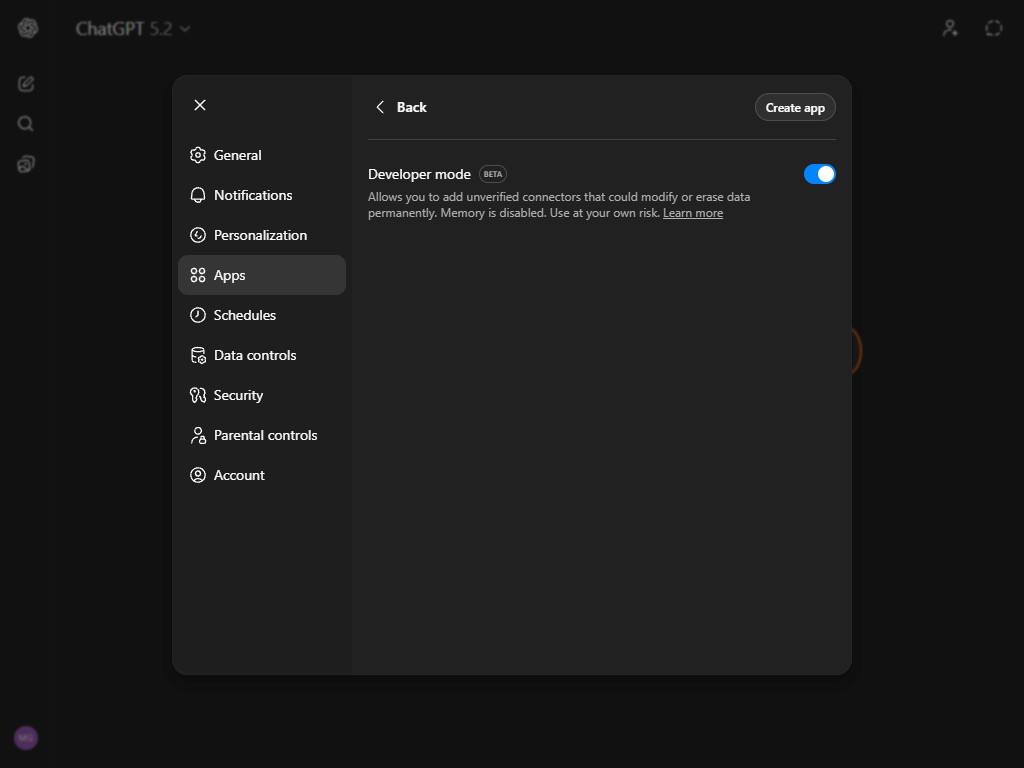
Fill in your MCP server details:
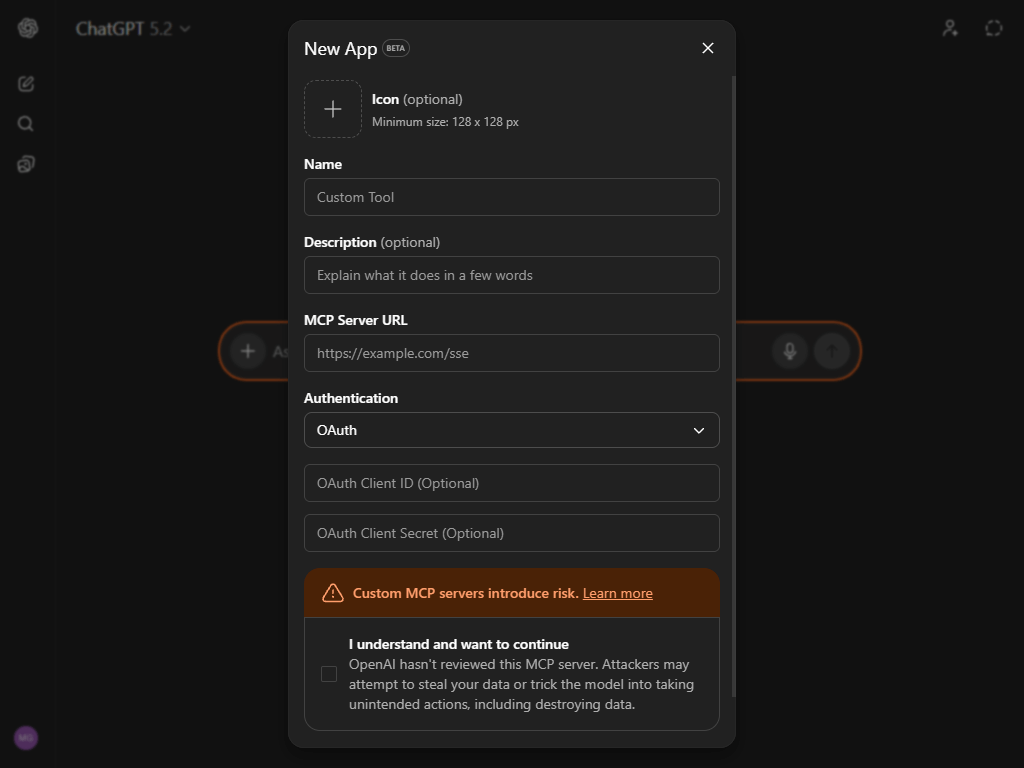
- Icon (Optional) – Upload an icon to represent your MCP server
- Name – How this MCP server appears in ChatGPT (e.g., “My MCP”)
- Description (Optional) – Personal note about what this server does
- MCP Server URL – Full HTTPS URL (e.g.,
https://my.example.com/mcp) - Authentication – OAuth is recommended
- I understand and want to continue – Confirm after reviewing OpenAI’s MCP risks
Click Create
You will be redirected to your OAuth provider to authorize the connection.
Verify connection and available tools
After successful authentication, ChatGPT will display the MCP server’s available tools. Make note of these tool names for testing.
Testing #
Start a new chat session
Add the MCP server to the chat
- Click the [+] icon in the prompt area
- Click “…more”
- Select your MCP server
INFO: MCP servers must be manually added to every new chat session, even if configured globally.
Verify tools are available
Ask:
Do you have a list of tools available?Test a tool invocation
Invoke one of your MCP server’s tools to confirm connectivity.
Client-specific usage, quirks and limitations #
CRITICAL: ChatGPT Projects do not support MCP tools
Although MCP servers may appear selectable in Projects, tools are not exposed to the model at runtime. MCP tools only function in standard chat conversations.
This is a ChatGPT client limitation, not an MCP server issue.
Voice mode: MCP tools are not currently available in ChatGPT Voice conversations.
Historical note: Earlier ChatGPT MCP implementations exhibited client-side issues such as repeated consent dialogs, injected metadata, and blocked or replayed tool calls. These behaviors are no longer observed in current ChatGPT Web/App clients.